Learn Chinese from the videos you already watch
Waku puts pinyin over every subtitle line and your own language underneath. Point at a word and the video waits while you read its card. Save it, and it comes back as a flashcard — with the sentence you met it in.
No accountNo trackingWorks on YouTube right away
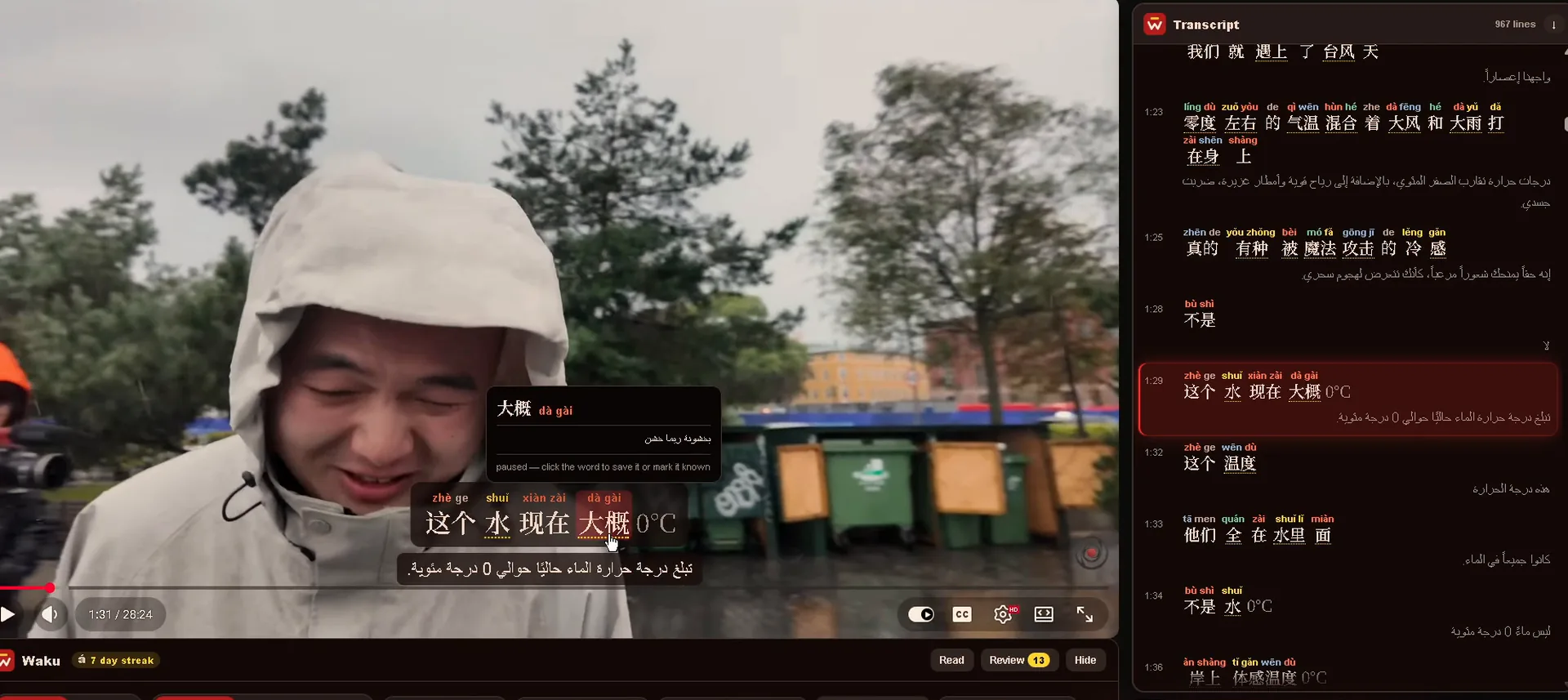
Point at a word. The video waits.
- Pinyin above every word, coloured by tone, so you hear the line before you can read it.
- A card for every word — what it means and what it’s built from.
- Save it and it becomes a flashcard. Mark it known and its pinyin steps aside.
Hover (or tap) any word in the player.
One syllable, four meanings
In Mandarin the pitch changes the word. Waku colours each syllable by its tone, so your eyes learn what your ears are hearing. Tap one:
Seven places to watch, one set of flashcards
Waku works on YouTube the moment you install it. Switch on any of the others from the toolbar popup — Chrome asks your permission for that one site, and you can take it back whenever you like. Go on, flip a few:
Waku needs the video to have Chinese subtitles you can switch on — it reads those, not text burned into the picture. On YouTube it puts a small 中文 badge on the videos that have them, so you can find something to learn from at a glance.
Every word, in the sentence you met it
- Spaced repetition brings each word back just before you’d forget it.
- The real line from the video and its translation sit on the back of the card.
- One click back to the moment — the video opens at the second you saved it.
Words you save in the player above land here. Click the card to turn it over.
Space turns the card · 1 Again · 2 Good · 3 Easy
Your days, in one picture
- A calendar of every day you actually learned something.
- The mark above the W climbs the four tones as your streak grows.
- One missed day a week is forgiven, quietly. No countdowns, no guilt.
- ā First tone 1 day
- á Second tone 7 days
- ǎ Third tone 14 days
- à Fourth tone 30 days
- āáǎà All four 100 days
Themes you earn by showing up
- Thirteen colour themes that follow you onto the video.
- Nine are yours from day one. Four more unlock at seven, thirty, sixty and a hundred days.
- Earned on your best streak, so a week off never takes one away.
The locked ones follow the streak slider above — drag it and watch them open.
The whole transcript
Every line beside the video, with pinyin. Click one to jump straight there.
Seven languages underneath
English, Arabic, Spanish, French, Russian, Japanese or Korean — using Chrome’s own on-device translator where it can.
Pinyin only where you need it
Show it always, only over new words, or not at all — and switch to full immersion when you’re ready.
Loop a line for shadowing
Repeat one sentence until your mouth catches up with your ears.
Hear any word
Press the speaker on a flashcard to hear the word said aloud.
Find videos to learn from
On YouTube, videos with Chinese subtitles get a small 中文 badge, so you never open one that has none.
See the real thing in sixty seconds
Subtitles, word cards, flashcards and privacy — start to finish, recorded from the extension itself. Turn the sound on for the voice-over.
Your words stay on your computer
Waku has no account, no server of its own and no analytics. There is nowhere for your data to go. Read the privacy policy — it’s short, because Waku does very little.
No account
Install it and start watching. Nothing to sign up for, nothing to log in to.
No tracking
No analytics, no ads, no telemetry. Waku doesn’t know who you are or what you watch.
Stored in your browser
Flashcards, streaks and settings live in Chrome on your computer. Delete them any time from Settings.
Good to know
Is Waku free?
Yes — all of it. There’s no subscription and nothing locked. If Waku helps you, you can leave a tip on Ko-fi, but you never have to.
Which browsers does it work in?
Chrome on a computer. Browsers built on Chrome, such as Edge and Brave, can usually install it from the Chrome Web Store too. Phones and tablets aren’t supported.
Does the video need subtitles?
Yes. Waku works from the Chinese subtitles you can switch on in the player. It can’t read subtitles that are burned into the picture. On YouTube, look for the 中文 badge Waku adds to videos that have them.
How do I use it on Netflix or Bilibili?
Click the Waku icon in your toolbar and switch the site on. Chrome will ask your permission for just that site. You can switch it off again the same way.
Do I need an AI key or anything else?
No. Translations use Chrome’s own translator, which runs on your computer. If you want grammar explanations, you can add your own free Gemini key in Settings — it’s entirely optional.
What if I’m a complete beginner?
Start with pinyin always on and your language underneath, and save only the words you hear again and again. As they turn familiar, switch pinyin to new words only.
Your next video could be your next lesson
Install Waku, open a Chinese video on YouTube, and point at the first word you don’t know.
Add to Chrome — it’s free